Add actions to an activity
Actions are the steps that Privilege Secure runs for an activity. Each activity has three action groups:
| Group | When the actions run |
|---|---|
| Pre-Session (Grant) | Before the session begins. Use it to grant access, such as adding the login account to a group. |
| Session (Connect) | During the session. |
| Post-Session (Remove) | After the session completes. Use it to remove the access that the pre-session actions granted. |
Actions in a group run in the order listed. An empty group shows "(no actions)". To change the order, drag the handle of an action to another position in the same group. All three groups have the handle. It is unavailable while a group holds only one action. The steps that Privilege Secure adds itself, such as creating the login account, have no handle and always keep their place.
An action can be paired. A pre-session action that grants access is often paired with a post-session action that removes it. A blue linked chain icon marks an action that is paired with a remove action. A grey chain icon marks an unpaired action. Deleting one action of a pair also deletes the other.
Add an action
- In the left navigation pane, click Activities.
- Select the activity in the list.
- Click the green + button for the action group.
- In the Add Action to Pre-Session Group dialog (the title names the group you chose), select an Action Type.
- Complete the fields that appear. They depend on the action type.
- Click Okay.
- Repeat for each action in each group.
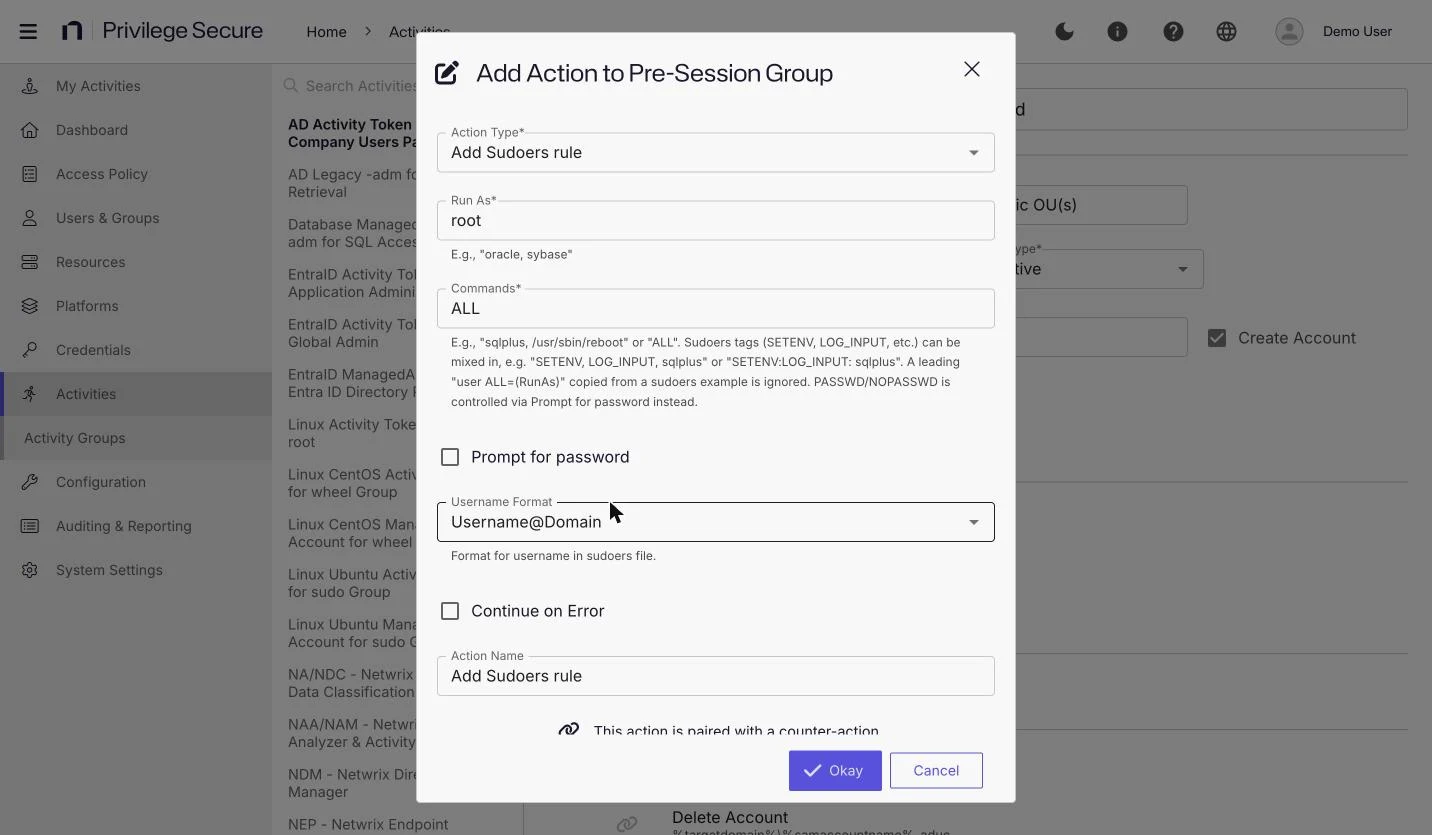
The action types are available only in the Action Type list of this dialog. The console has no separate page for them. See Action types reference for what each type does and its fields.
Fields that most action types share:
| Field | Description |
|---|---|
| Continue on Error | Continues to the next action if this action fails, instead of stopping. Selected by default for Post-Session (Remove) actions. |
| Action Name | Optional. A name for the action in the activity. |
| Paired Action's Name | Optional. For a paired action, a name for the action that Privilege Secure adds to the other group. |
The name of a saved action can differ from the name of its action type. For example, an action of type Add User to Local Group can appear in the activity as "Add to Local Administrators".
The Action Type list depends on the action group, not on the platform.
Example
This example grants local administrator rights before the session and removes them afterward.
- In the Pre-Session (Grant) group, click +.
- For Action Type, select Add User to Local Group.
- For Group, select Administrators.
- Click Okay.
Privilege Secure names the action Add to Administrators and adds the paired Remove from Administrators action to the Post-Session (Remove) group.
Change or remove an action
You can't change the action type of an existing action. Delete the action, then add a new one with the type you want.
Vault activities
For an activity with the Vault login account, Privilege Secure adds Check-out Credential to Pre-Session (Grant) and Check-in Credential to Post-Session (Remove). The add buttons for those two groups are disabled.
Run protection policies when a session ends
To run the protection policies that apply to the resource when the session completes, instead of waiting for the scheduled run, add the Invoke Protection Policy action to Post-Session (Remove). You don't select a protection policy. Privilege Secure runs every protection policy that applies to the session host.