Architecture and components
Privilege Secure has a central web service, a database, and a set of services that run actions, record sessions, and send notifications. You can install every component on one server or spread them across several. The Remote Access Gateway is an optional add-on for external users.
For the complete port list, see Ports. The ports on this page summarize the connections that the diagrams show.
Components
| Component | Role | Default port |
|---|---|---|
| Web service | Hosts the Privilege Secure Console and the REST API in Microsoft Internet Information Services (IIS). It reads and writes the database and communicates with each service. | TCP 6500 (HTTPS) |
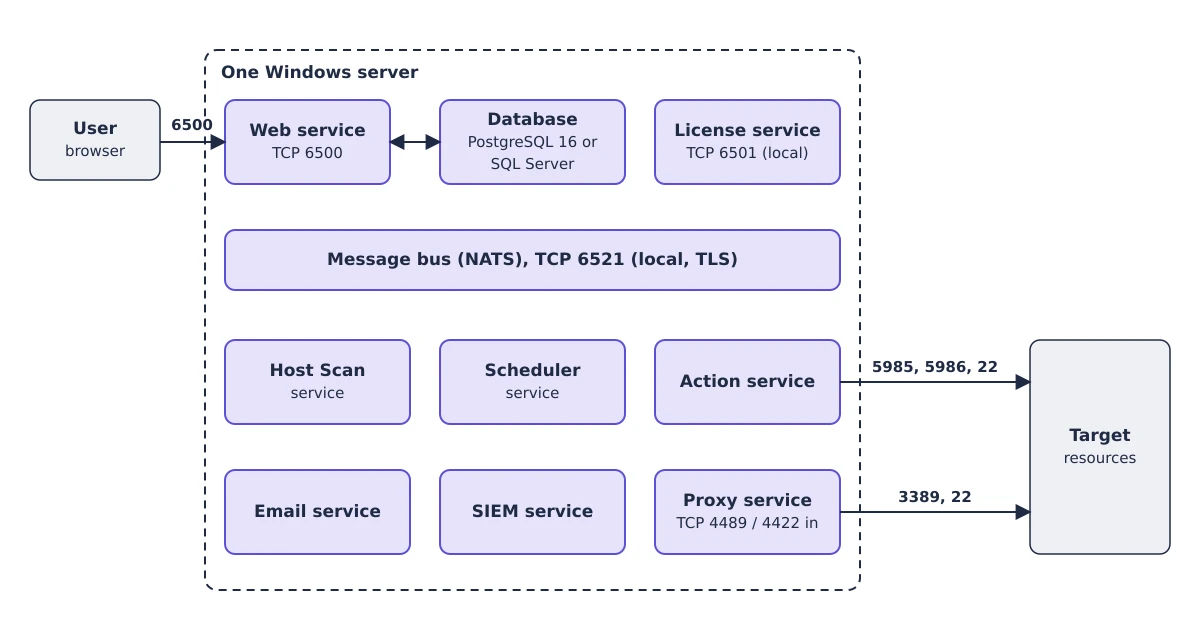
| License service | Stores the license and reports the license state to the web service. It listens on the local host. | TCP 6501 |
| Action service | Connects to managed resources and runs the actions that activities define, such as Active Directory sync, password changes, and account orchestration. You can run several Action services. | Outgoing connections vary by action |
| Host Scan service | Scans resources for accounts, services, scheduled tasks, and other data. | Outgoing connections vary by scan |
| Scheduler service | Runs scheduled work such as password changes and scans. | Not applicable |
| Email service | Sends notifications through an external SMTP server. It supports authenticated and unauthenticated connections and TLS. | Not applicable |
| SIEM service | Processes events and forwards them to a configured SIEM. It has built-in Common Event Format (CEF) and Log Event Extended Format (LEEF) templates. | Not applicable |
| Message bus (NATS) | Carries messages between the web service and the services on the same server. | TCP 6521 (local, TLS) |
| Proxy service | Connects users to resources over RDP and SSH and stores session recordings. You can run several proxies for load balancing and redundancy. | TCP 4489 (RDP in) and TCP 4422 (SSH in) |
| Service mesh | Connects remote services to the central web service. Each remote node joins the mesh so that traffic takes the most efficient route to the web service. | TCP 6520 to register, TCP 6523 for leaf nodes, and TCP 6524 for cluster nodes |
| Remote Desktop Monitor service | Runs on target Windows hosts and sends the window and menu activity of an RDP session to the recording. | Not applicable |
| Database | Stores configuration, sessions, and credentials. PostgreSQL 16 or Microsoft SQL Server. | See Database requirements |
The Proxy service connects to resources on TCP 3389 (RDP) and TCP 22 (SSH). The Action service uses PowerShell remoting over Windows Remote Management (WinRM) on TCP 5985 or 5986, or SSH on TCP 22. It also connects to Active Directory on several ports. The connection broker in the Proxy service listens on TCP 6522 on all network interfaces by default. It carries TLS-encrypted calls between Proxy service instances.
Open the console at https://<nps-server>:6500. See Ports for where this port is set.
Data flow
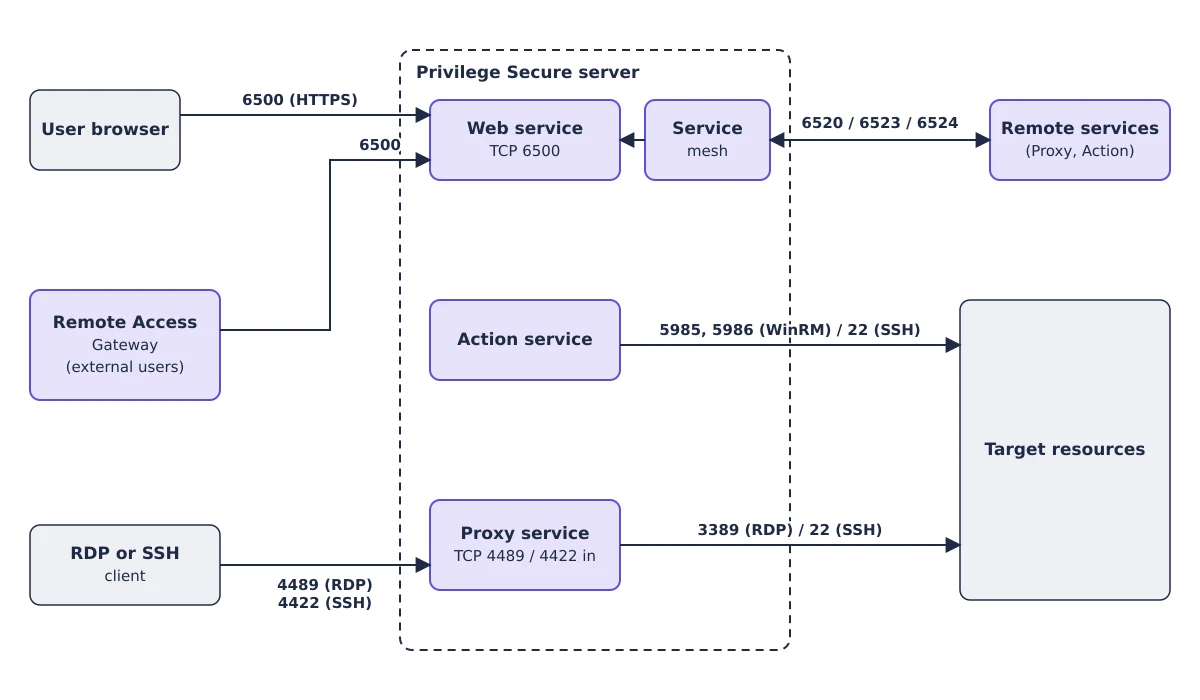
- A user opens the console on the web service at TCP 6500.
- The user starts a session. The Action service runs the pre-session actions on the resource.
- The user connects to the Proxy service on TCP 4489 (RDP) or TCP 4422 (SSH). The proxy connects to the resource on TCP 3389 or TCP 22 and records the session.
- When the session ends, the Action service runs the post-session actions.
Remote Access Gateway components
The Remote Access Gateway lets external users start browser-based RDP and SSH sessions without direct access to the console. It is an add-on with its own installers. The components are:
| Component | Where it runs | Default port |
|---|---|---|
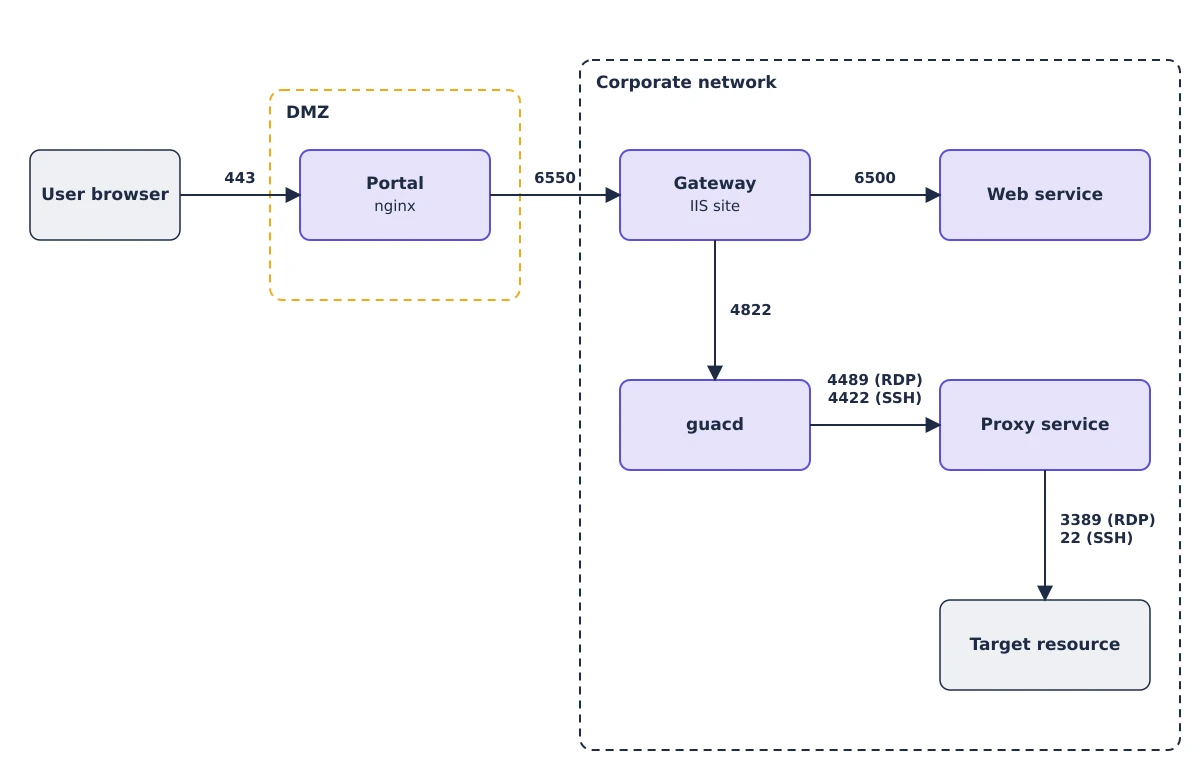
| Portal | In the DMZ. It runs on nginx as the SbPAMRagPortal Windows service and is the entry point for external users. | TCP 443, with TCP 80 redirecting to HTTPS |
| Gateway | Inside the network. It is an IIS site that passes a fixed set of requests from the Portal to the console. | TCP 6550 |
| guacd | On the Gateway host under Windows Subsystem for Linux 2 (WSL 2). It is the Apache Guacamole 1.6.0 daemon and runs in Docker. | TCP 4822 |
A browser session follows this path:
- The browser connects to the Portal on TCP 443.
- The Portal passes requests to the Gateway on TCP 6550.
- The Gateway calls the web service on TCP 6500 and opens a tunnel to guacd on TCP 4822.
- guacd connects to the Proxy service on TCP 4489 (RDP) or TCP 4422 (SSH). The proxy connects to the resource, so recording and command restrictions still apply.
See Remote Access Gateway overview.
Deployment topologies
Single server
All components install on one Windows server. This topology suits a proof of concept or a test.
Server with remote services
The Proxy and Action services use resources in proportion to load. Install them on additional hosts for scalability, redundancy, or network segmentation. You can then disable the services on the application server. Remote services reach the web service through the service mesh.
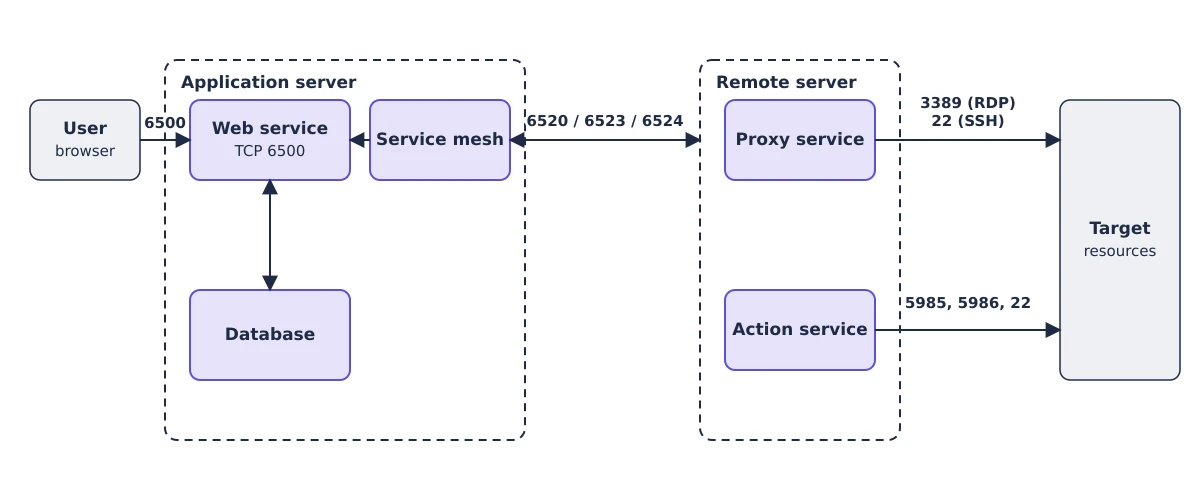
See Install services on additional servers and Install a proxy service on another server. A remote Proxy service installs from a Windows installer and supports Windows Server 2016 through 2025, the same versions as the application server.
Active-passive database
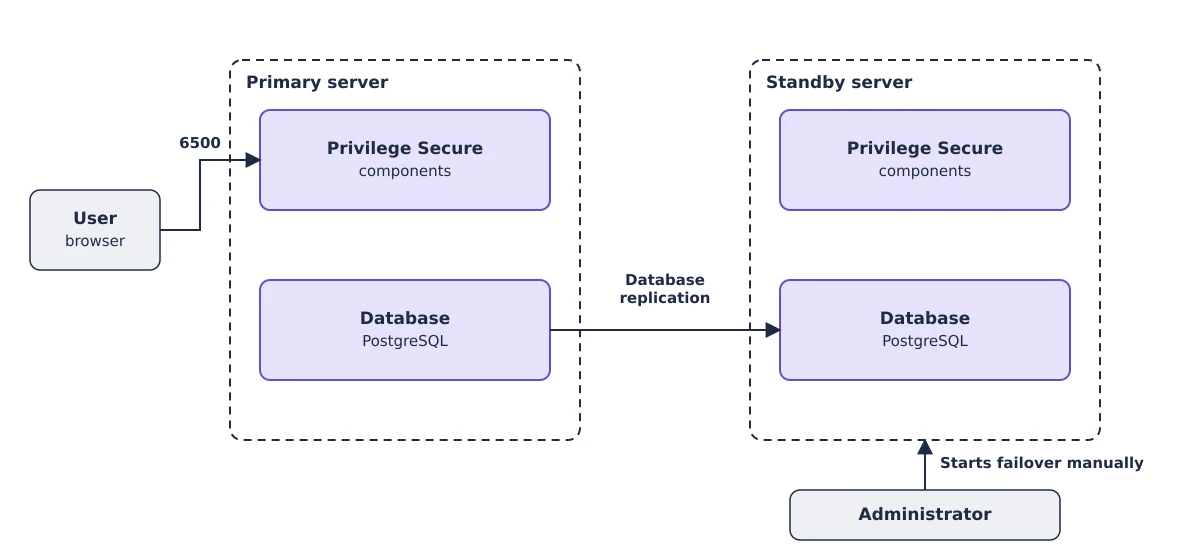
Two identical servers run all components. The databases replicate from the primary to the standby. When the primary is unavailable, an administrator starts the failover manually. See High availability options. This topology requires PostgreSQL and works with the bundled database. It is the simplest high-availability option.
Active-active database
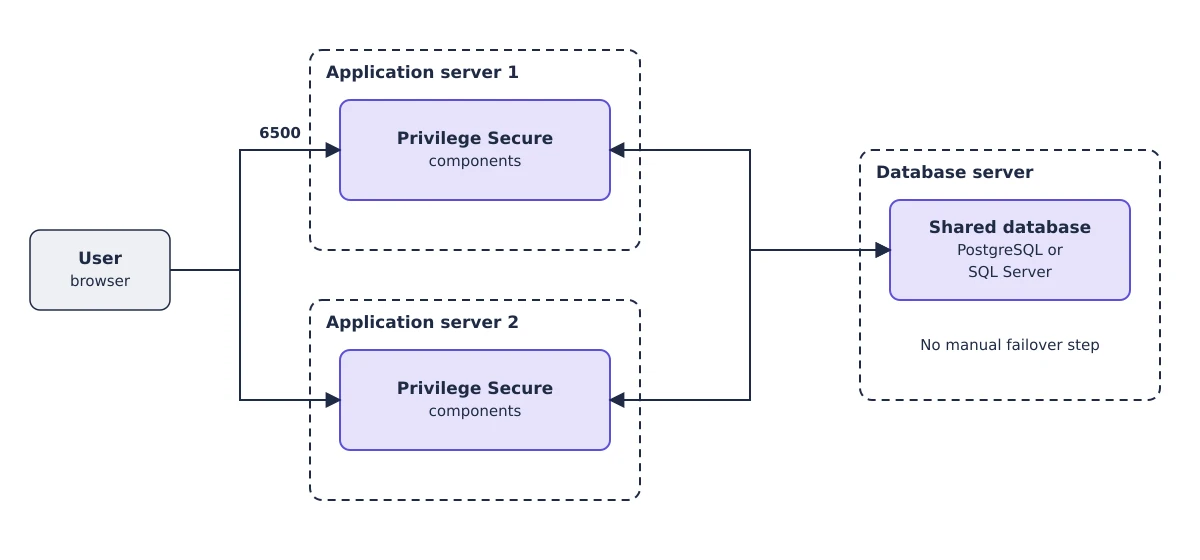
Several application servers share one database. Failover needs no manual step. This topology works with PostgreSQL and SQL Server. Setup is more complex, and you need an additional server for the database.
Cloud database
A customer-provided cloud database provides built-in high availability and automatic scaling, which suits an active-active deployment. Privilege Secure connects to your PostgreSQL or SQL Server database with standard connection strings. See Database requirements for the engines and versions.
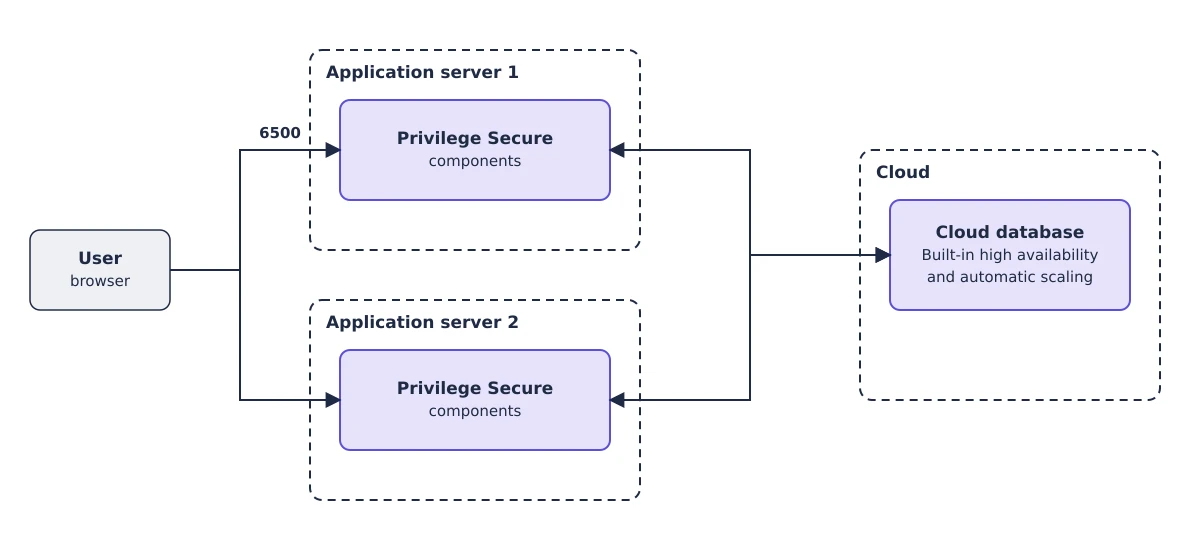
For setup details, see High availability options.
Vault integrations
Activities can use credentials from other vaults and from Microsoft Local Administrator Password Solution (LAPS). The diagrams and setup are in Vault connectors.