Privilege Secure for Access Management overview
Netwrix Privilege Secure for Access Management (Privilege Secure) is a privileged access management (PAM) product. It controls the activity that a user performs on a system instead of mapping that user to a standing privileged account. Administrators and help desk staff request the access they need for a task, and Privilege Secure grants it for a limited time and removes it when the task ends.
How just-in-time access works
Privilege Secure works from the task. An administrator defines an activity, such as adding the requester to the local Administrators group on a server. The administrator then links that activity to users and resources in an access policy.
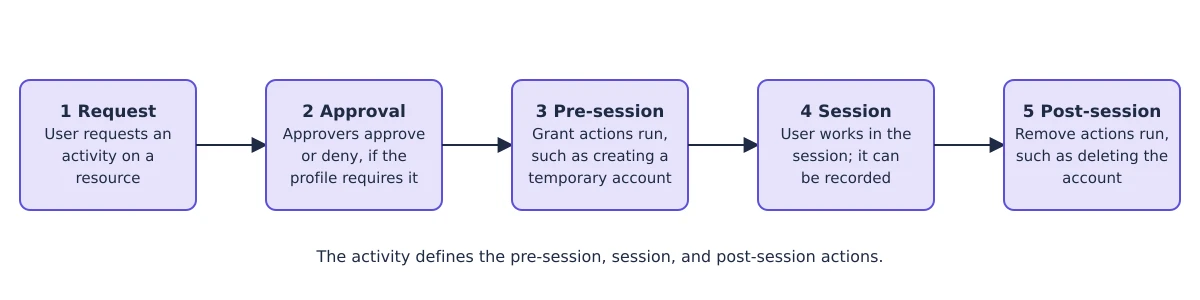
A session follows these stages:
- A user requests an activity on a resource in the console, in a browser, or from their own Remote Desktop Protocol (RDP) or Secure Shell (SSH) client.
- If the connection profile requires approval, the approvers in its approval workflow approve or deny the request.
- Before the session starts, Privilege Secure runs the activity's pre-session actions. For example, it creates a temporary account and adds it to a privileged group.
- The user works in the session. Privilege Secure can record the session.
- When the session ends, Privilege Secure runs the post-session actions. For example, it removes the account from the group and deletes the temporary account, or rotates the password of a managed account.
The account that the user signs in with on the target system can be the user's own account, an account Privilege Secure manages, or an ephemeral account that Privilege Secure creates for one session. See Key concepts for the login account types.
What you can do with Privilege Secure
- Grant time-limited access to Windows and Linux servers, Active Directory, Microsoft Entra ID, databases, network devices, and websites.
- Give users access to credentials and files stored in a vault, or bring in credentials from other vaults.
- Require notes, a ticket number, or multi-tier approval before a session starts.
- Record RDP and SSH sessions, watch live sessions, and replay them.
- Rotate and verify the passwords of managed accounts on a schedule.
- Review who has access with access certification, and report on sessions and password changes.
- Send events to a security information and event management (SIEM) system and validate ticket numbers against ServiceNow.
- Let external users start browser-based sessions through the Remote Access Gateway without exposing the console.
The console is available in English, French, Italian, German, Spanish, Korean, and Traditional Chinese. See Navigate the console.
Who uses Privilege Secure
| Person | What the person does | Where to start |
|---|---|---|
| Administrator | Installs the product, onboards resources, and writes activities and access policies. | Quick start |
| User | Requests sessions and connects to resources. | Request a session |
| Approver | Approves or denies session requests. The approvers are the users and groups that a tier of the approval workflow names. | Approve or deny session requests |
| Reviewer | Certifies or denies access in an access certification. | Review access |
| Auditor | Views live sessions and recordings, and reads reports and logs. | Audit sessions |
Where to go next
- Key concepts explains access policies, activities, resources, sessions, and roles.
- Architecture and components shows the parts of the product and how they connect.
- Quick start lists the setup tasks in order.
- Glossary and product names defines terms and explains the legacy names that appear in service names and file paths.
- Requirements lists what you need before you install.