SIEM templates and event fields
A SIEM template sets the content and layout of each message that Privilege Secure sends to a SIEM server. You select a template when you add a SIEM server.
Privilege Secure includes two templates, CEF and LEEF. You can also create custom templates.
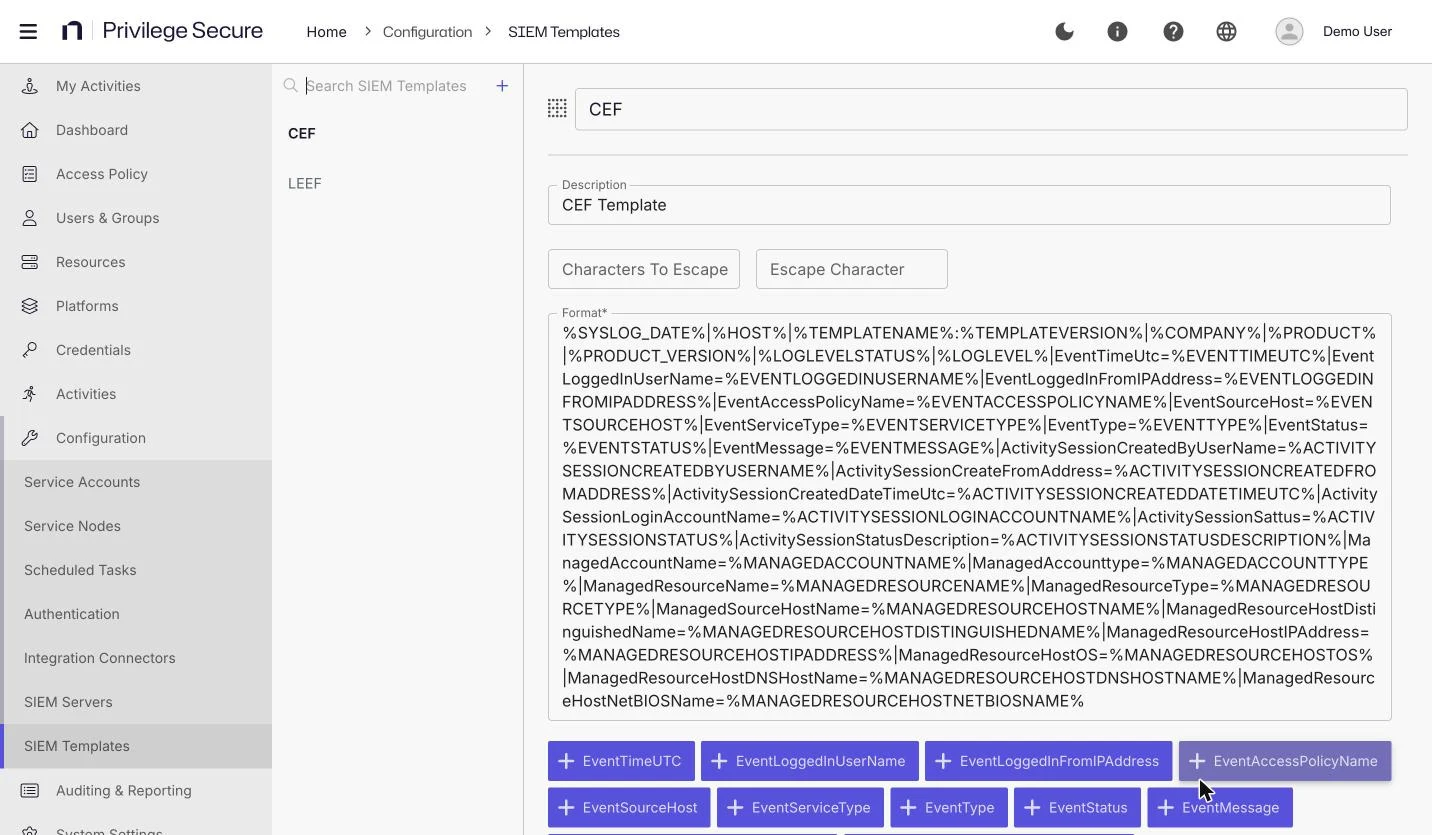
The CEF and LEEF templates contain the same message body. Both messages start with the date and the host name, then the template name and version, the company, the product, the product version, and the event status. They start with %SYSLOG_DATE%|%HOST%, not with a CEF: or LEEF: header. Test the output in your SIEM before you rely on it, and create a custom template if your SIEM needs a different layout.
Create a custom template
- Select Configuration > SIEM Templates.
- Click + above the list.
- Fill in the fields in the table.
- Click Save.
| Field | Description |
|---|---|
| Name | The name of the template. |
| Description | A description of the template. |
| Characters To Escape | The characters in event text that need an escape character. |
| Escape Character | The character that you put before each escaped character. |
| Format* | The message body. Edit it directly, or insert event fields from the field buttons. |
An asterisk (*) marks a required field.
To insert a field, place the cursor in Format and select the plus icon next to the field name.
The field buttons insert the placeholder in the form |FieldName=%FIELDNAME%, with the placeholder in upper case. Placeholders in the built-in templates use the form %FIELDNAME% in upper case, for example %EVENTTYPE%. The following sample Format value uses placeholders:
%SYSLOG_DATE%|%HOST%|EventType=%EVENTTYPE%|EventStatus=%EVENTSTATUS%|EventMessage=%EVENTMESSAGE%
Pipe characters (|) in the text of an event message are removed before the message is sent.
Event fields
The editor offers 25 fields. Each field belongs to the event, the session behind the event, or the account and resource involved.
| Group | Fields |
|---|---|
| Event | EventTimeUTC, EventLoggedInUserName, EventLoggedInFromIPAddress, EventAccessPolicyName, EventSourceHost, EventServiceType, EventType, EventStatus, EventMessage |
| Session | ActivitySessionCreatedByUserName, ActivitySessionCreatedFromAddress, ActivitySessionCreatedDateTimeUTC, ActivitySessionLoginAccountName, ActivitySessionStatus, ActivitySessionStatusDescription |
| Account | ManagedAccountName, ManagedAccountType |
| Resource | ManagedResourceName, ManagedResourceType, ManagedResourceHostName, ManagedResourceHostDistinguishedName, ManagedResourceHostIPAddress, ManagedResourceHostOS, ManagedResourceHostDnsHostName, ManagedResourceHostNetBiosName |
Fields about a session, account, or resource are empty for events that don't involve one.
The built-in CEF and LEEF templates write each field as key=value. Some keys differ from the field names in the editor, for example ActivitySessionSattus, ManagedAccounttype, ManagedSourceHostName, ActivitySessionCreateFromAddress, EventTimeUtc, ManagedResourceHostDNSHostName, and ManagedResourceHostNetBIOSName. Match these keys exactly in your SIEM parser, or create a custom template with the keys that you want.
Header placeholders
A message can start with a header made of the following placeholders.
| Placeholder | Description |
|---|---|
%SYSLOG_DATE% | The time that Privilege Secure sends the message, in sortable universal format. For the time of the event, use %EVENTTIMEUTC%. |
%HOST% | The host name of the computer that runs the SIEM service. |
%TEMPLATENAME% | The name of the template. |
%TEMPLATEVERSION% | The version of the template. If the template has no version, the value is 1.0. |
%COMPANY% | The company name from the version information of the SIEM service. |
%PRODUCT% | The product name from the version information of the SIEM service. |
%PRODUCT_VERSION% | The product version from the version information of the SIEM service. |
%LOGLEVELSTATUS% | The status of the event as text: Information, Warning, or Error. |
%LOGLEVEL% | The status of the event as a number: 0 for Information, 1 for Warning, or 2 for Error. |
The enumerated fields hold the name of the value:
| Field | Values |
|---|---|
EventServiceType | Unspecified, WebUi, ActionService, ProxyService, SchedulerService, EmailService, ADSyncService, RagGateway, RagPortal |
EventType | Unspecified, Status, ServiceStart, PasswordRotation, HostScan, ADSync, ActivitySession, Manage, Unmanage, Verify, RotateServices, CommandRestrictionAction |
The names of the event fields describe their content. EventServiceType is the Privilege Secure service that raised the event, and EventType is the kind of event.