Third-party vault connectors
Privilege Secure has a built-in vault for credential management. Many organizations already store credentials in another vault. A vault connector lets Privilege Secure activities use the passwords from that vault, so you don't have to move or re-enter them.
How activities use a vault
A vault connector is an integration connector. You create it under Configuration > Integration Connectors. An activity then uses the connector as follows:
- You create an activity with Login Account set to Vault and select the connector in Vault Connector. See Create an activity.
- Privilege Secure fills the Pre-Session (Grant) group with Check-out Credential and the Post-Session (Remove) group with Check-in Credential.
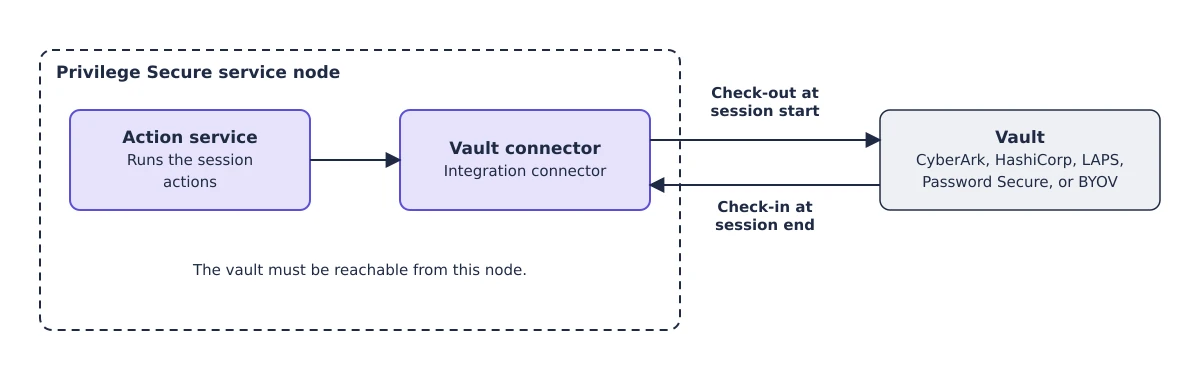
- When a session starts, the connector checks out the credential from the vault. When the session ends, the connector checks the credential back in.
To let the user see the password that the vault supplies, select Allow User to Access Password in the connection profile. See Connection profiles.
Where the connector runs
The Action Service on the Privilege Secure service node calls the vault during the session's Pre-Session (Grant) and Post-Session (Remove) actions. The vault must be reachable from that node.
Each built-in connector connects to the address in its own settings. CyberArk, HashiCorp, and Password Secure use the API Url of the connector, so the port is the one in that URL. LAPS reads Active Directory for the domain in Domain Name, and its check-in also opens a WinRM connection from the service node to the target computer. A BYOV connector connects to whatever address its scripts use; its built-in check-in calls the Privilege Secure API that the Action Service uses. No connector runs from another component.
Available connectors
| Connector template | Source of the credentials | Page |
|---|---|---|
| BYOV | Any vault, through PowerShell scripts that you provide. Also Privilege Secure itself. | Bring Your Own Vault connector |
| CyberArk | CyberArk | CyberArk integration |
| HashiCorp | HashiCorp Vault | HashiCorp Vault integration |
| LAPS | Local administrator passwords in Active Directory | LAPS integration |
| Password Secure | Netwrix Password Secure | Netwrix Password Secure integration |
Choose a connector
- Use the connector that matches your vault, when one exists.
- Use BYOV when your vault has no dedicated connector. You write the check-out and check-in scripts.
- Use BYOV with Privilege Secure as the vault to use accounts that you store in a secret vault, or manual accounts, in an activity. See Secret vaults.
- Use LAPS when Active Directory manages the local administrator passwords.
Check-in
The check-in step runs for every connector. When the last session that uses a credential ends, Privilege Secure erases the stored password and runs the connector's check-in. What the built-in check-in does depends on the connector:
| Connector | Built-in check-in |
|---|---|
| BYOV | Deletes the credential record from Privilege Secure. |
| CyberArk | Does nothing. |
| HashiCorp | Checks the account back in to the library. |
| LAPS | Sets the password expiration time to 0 and runs gpupdate /force on the computer over WinRM, so LAPS rotates the password. When WinRM is disabled for the host, or the session doesn't open, LAPS rotates the password at its next policy refresh. |
| Password Secure | Does nothing. |
For a BYOV or CyberArk connector, a Checkin Script Block replaces the built-in check-in.