Remote Access Gateway overview
The Remote Access Gateway extends Netwrix Privilege Secure for Access Management (Privilege Secure) to external users, such as remote workers and third-party vendors. Users sign in to a web portal and open Remote Desktop Protocol (RDP) and Secure Shell (SSH) sessions in the browser. They don't need a VPN or a Privilege Secure client. Release notes and download pages also call the feature Session Remote Access or Secure Remote Access (SRA). File names and installers use the abbreviation RAG, for example NPS.RagGateway.exe.
The browser experience matches the Privilege Secure console for the actions an external user needs: request an activity, wait for approval, and connect to the session. See Connect to a session in the browser.
Components
The Remote Access Gateway has three components. Install the portal in the demilitarized zone (DMZ). Install the gateway and the Apache Guacamole daemon (guacd) inside your network.
| Component | Where it runs | What it does |
|---|---|---|
| Portal | A dedicated server in the DMZ | Serves the sign-in page and the browser interface to users on port 443. It runs as the NPS Rag Portal Windows service and uses nginx. It forwards user requests to the gateway. |
| Gateway | A Windows server inside the network | Runs as the Internet Information Services (IIS) site NPS Gateway Web Service on port 6550. It passes an allowed set of requests to Privilege Secure on port 6500 and opens session connections to guacd. |
| guacd | The gateway server, in Docker under Windows Subsystem for Linux 2 (WSL 2) | Translates between the browser and the Privilege Secure proxy. It listens on port 4822 and uses Transport Layer Security (TLS) by default. |
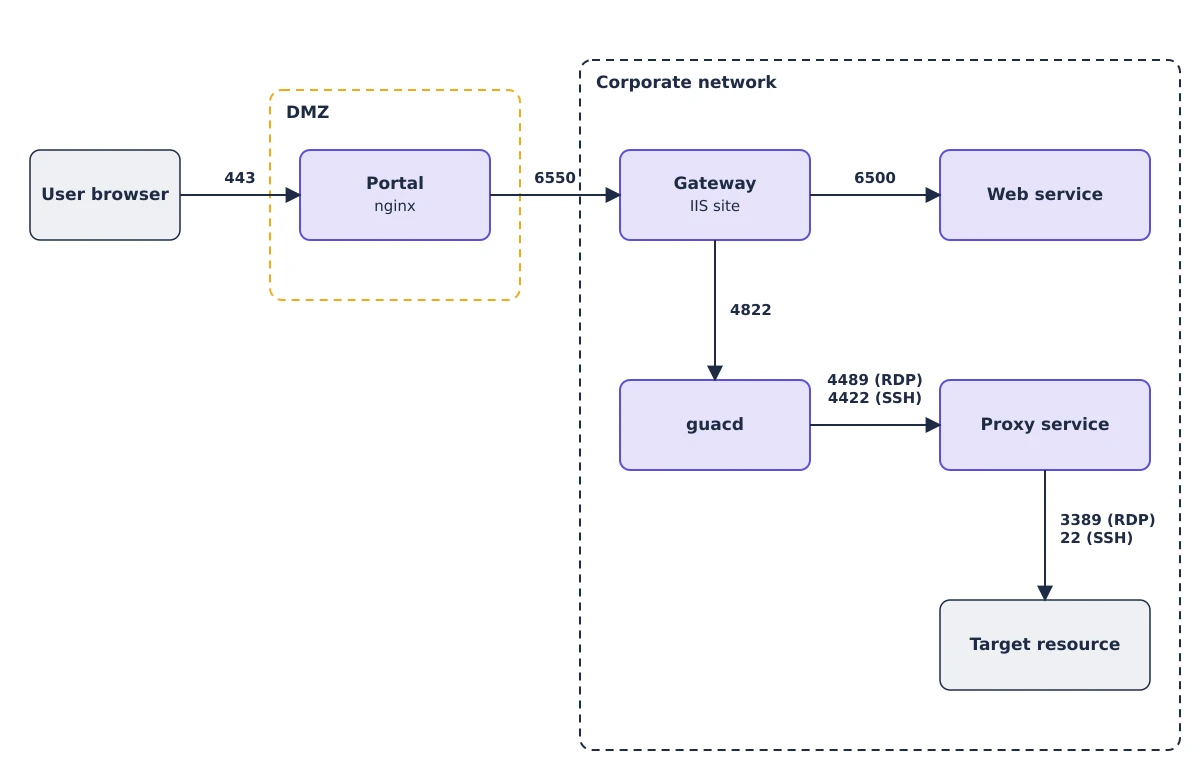
How a browser session reaches a target
- The user opens the portal over HTTPS and signs in.
- The portal forwards the request to the gateway on port 6550.
- The gateway forwards the request to Privilege Secure on port 6500. The gateway forwards only a fixed list of requests.
- When the user connects to an available session, the browser opens a WebSocket connection through the portal to the gateway.
- The gateway connects to guacd on port 4822. guacd connects to the Privilege Secure proxy on port 4489 for RDP or 4422 for SSH.
- The proxy authenticates the session, connects to the target system, and records the session.
The user's browser never connects to the application server or to the target system directly.
What external users can reach
The gateway exposes only what an external user needs: sign-in, the activities that the user's access policies allow, the user's sessions, and approvals. Administration pages, logs, and configuration aren't available through the portal.
Sign-in methods
A new gateway allows single sign-on (SSO) only. You can also allow local Privilege Secure users, or local and domain users. See Configure sign-in for the portal.
Plan the deployment
- Review the hosts, software, ports, and certificates in Remote Access Gateway requirements.
- Install the gateway and guacd. See Install the gateway and guacd.
- Install the portal. See Install the portal.
- Configure sign-in. See Configure sign-in for the portal.
For the ports that each connection uses, see Ports. For the Privilege Secure architecture, see Architecture.